From curiosity to a plan.
Watch one student go from “I don’t know” to a next step they can take. Then see your part: what you assign, what you review, and what you can report.
Fictional demo: Alex, grade 11.
Skip to your part
Part 1 of 4Student exploration
Give curiosity a direction.
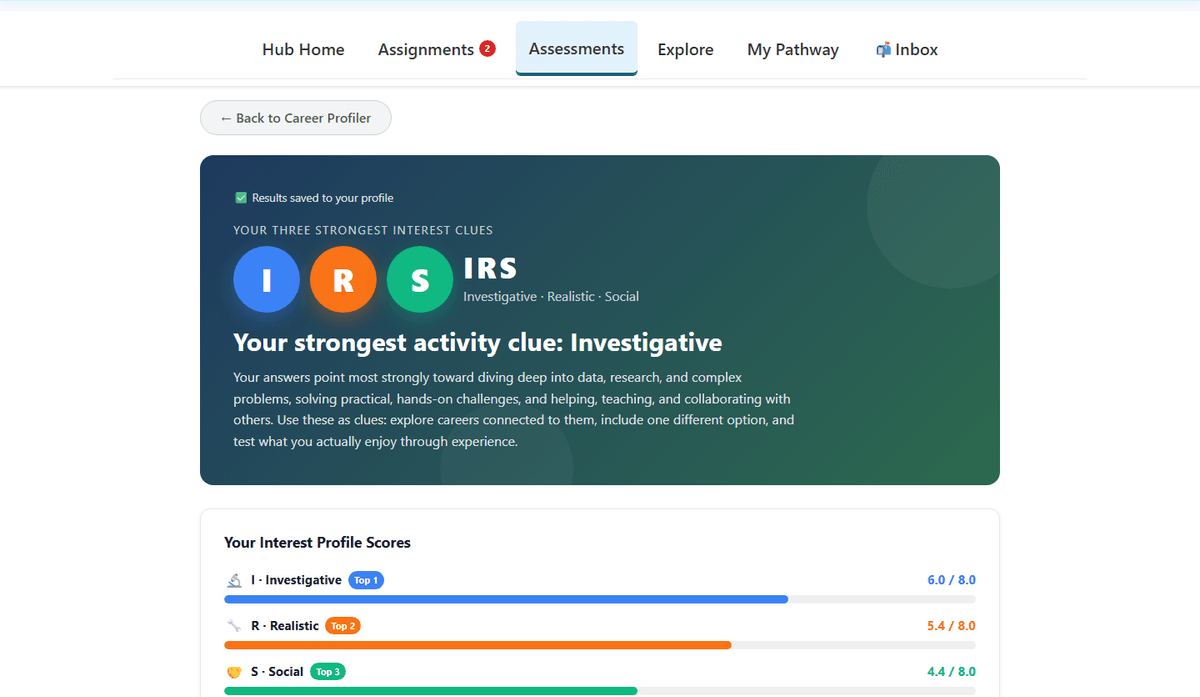
Assessment overview. Students can understand their interests and use both assessment results to explore careers.
Students can understand their interests and use both assessment results to explore careers.
An assessment starts a conversation. It does not choose a career for the student.
What the recording shows
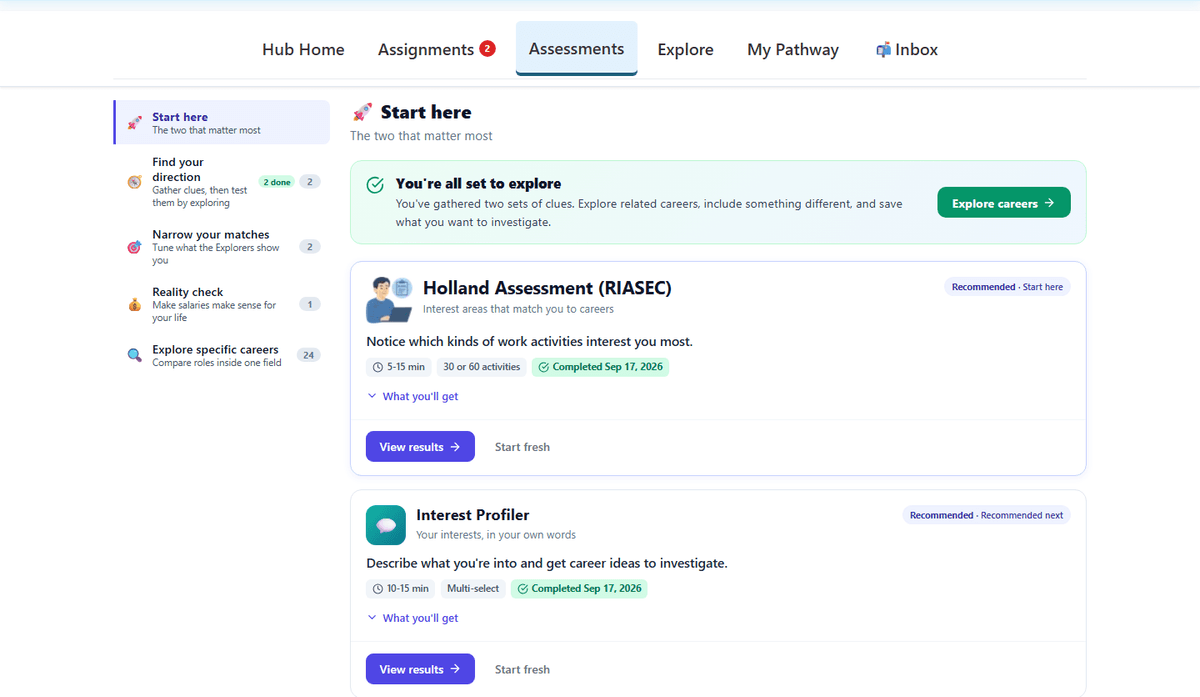
The assessments page brings Alex’s completed assessments into one place. Students can return to their results as their exploration develops.
What students get here, 02 of 05Know a career before choosing it
Daily work, pay, and real tasks to test it.
See the work. Test it. Compare it.
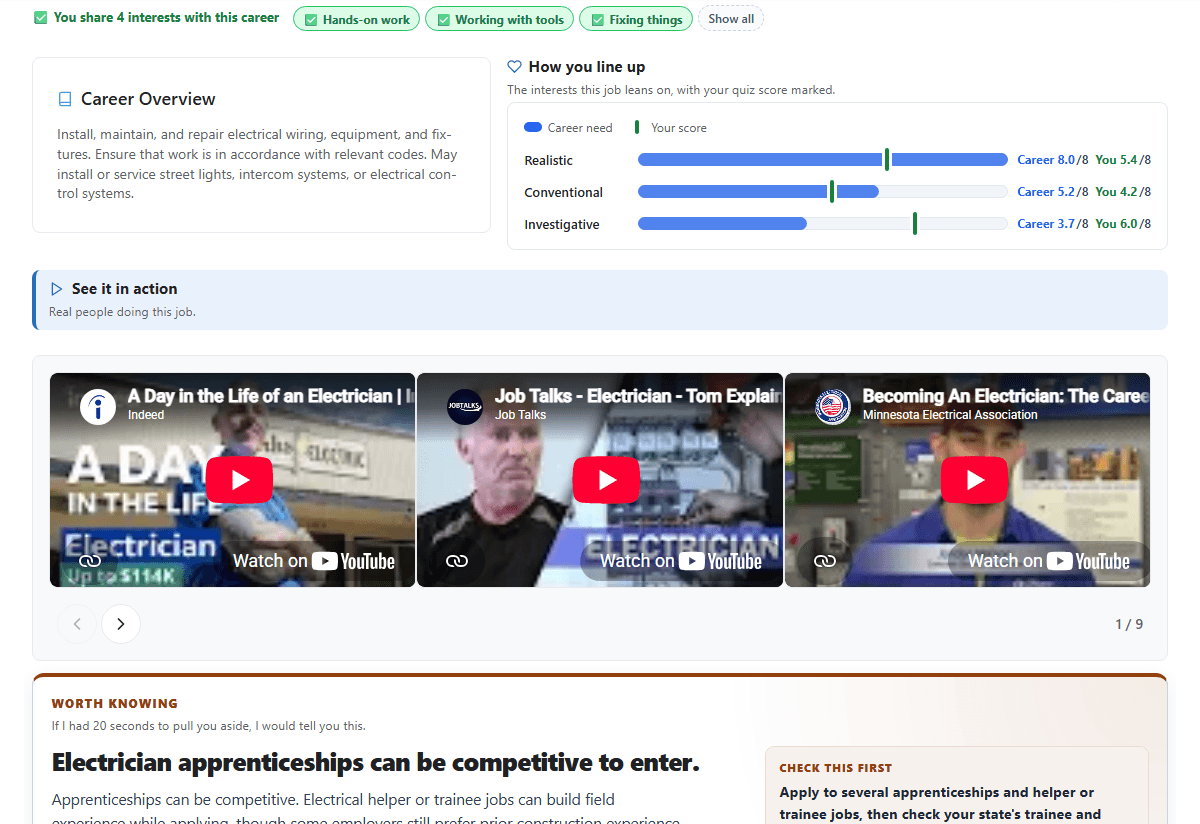
Profile tour. Students can understand what the work involves, what it pays, and what it takes to enter the field.
Students can understand what the work involves, what it pays, and what it takes to enter the field.
Honest about the way in: a helper job is a starting point, not guaranteed admission to an apprenticeship.
What the recording shows
This tour moves through the Electricians profile: Overview, Daily Activities, Pay, Entry Routes, Related Courses, AI, and Validate. The shorter examples below give each topic a closer look.
What students get here, 01 of 05Every real way in
All the paths into each career, not just the usual one.
Three careers. Every route into each, with its steps.
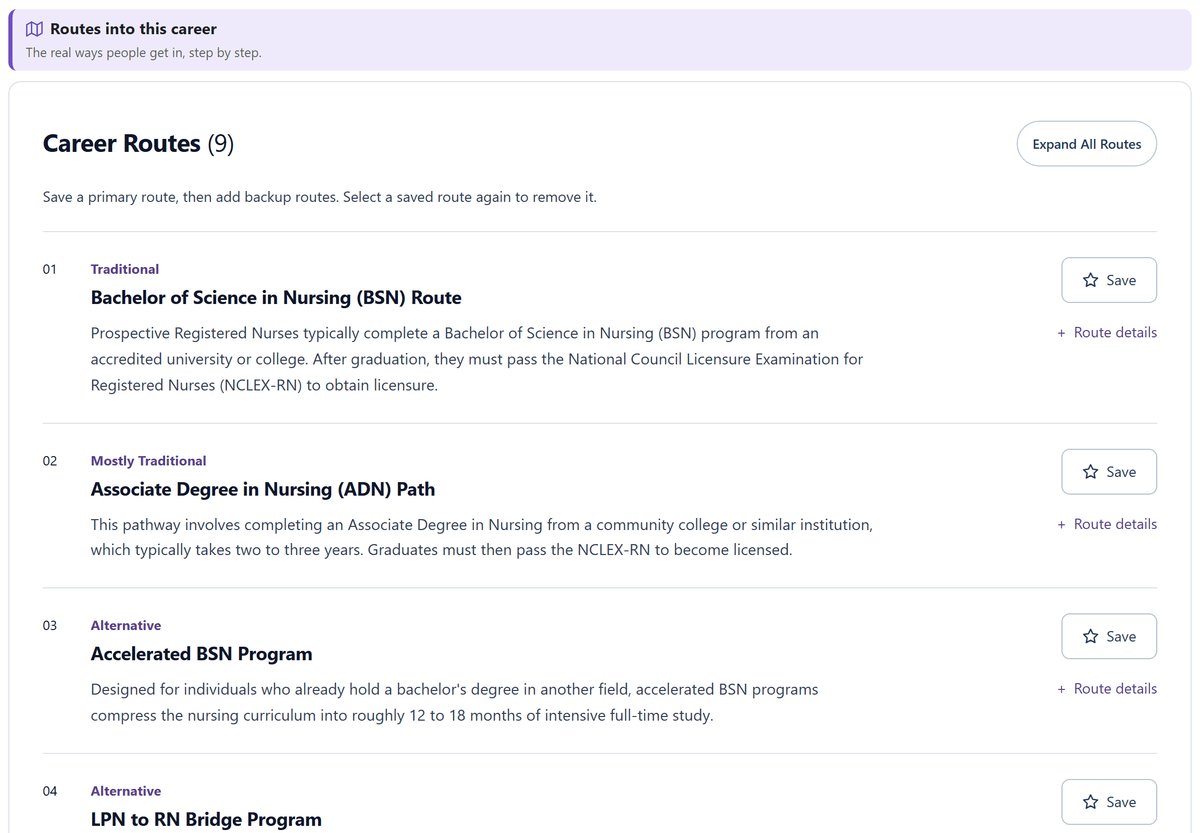
Nursing: every route. Every common way in, labelled traditional or alternative: the four-year degree, the two-year degree, the accelerated program for people who already hold a bachelor’s, and the bridge for working LPNs.
Every common way in, labelled traditional or alternative: the four-year degree, the two-year degree, the accelerated program for people who already hold a bachelor’s, and the bridge for working LPNs.
Routes describe how people commonly enter a career. Every program, sponsor, and employer sets its own requirements.
What the recording shows
Alex opens Routes for Registered Nurses, which lists nine routes. The first four are the Bachelor of Science in Nursing, the Associate Degree in Nursing, the Accelerated BSN Program, and the LPN to RN Bridge Program. Each can be saved as a primary or backup route.
Alex scrolls through the remaining routes. Saving is not performed in this recording.
What students get here, 03 of 05Majors, by the doors they open
The careers each major leads to and what they pay.
See where a major leads, and what those careers pay.
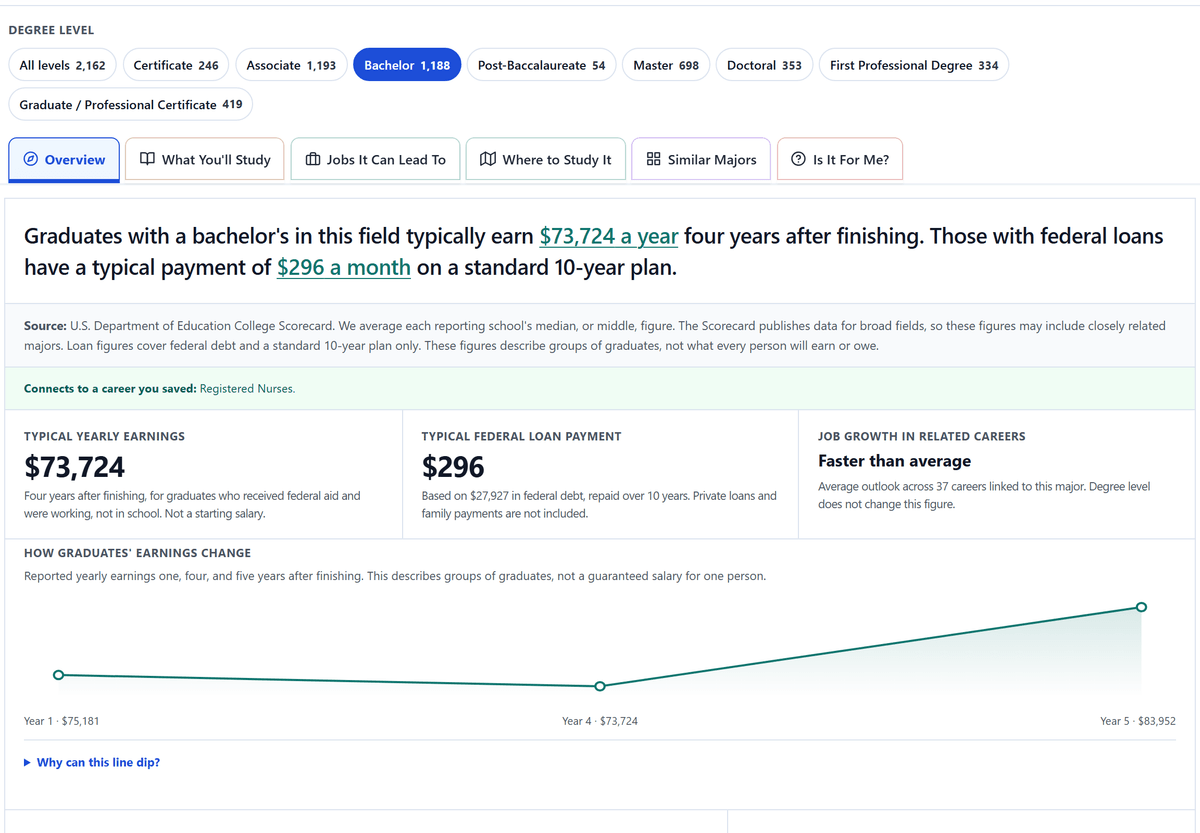
Nursing: where it leads. Students see what nursing graduates typically earn, the twelve careers the major connects to with pay and the education people in them hold, and the majors next door.
Students see what nursing graduates typically earn, the twelve careers the major connects to with pay and the education people in them hold, and the majors next door.
Graduate earnings describe the field as a whole, and career pay is a national median for people already in the job, not a starting salary. A biology degree alone does not qualify someone to become a registered nurse.
What the recording shows
Alex opens Registered Nursing, Nursing Administration, Nursing Research and Clinical Nursing. The overview states typical earnings four years after finishing and a typical federal loan payment. Jobs It Can Lead To lists twelve connected careers with median pay and the education people in each career have, from nurse anesthetists to registered nurses, which Alex has already saved. Similar Majors shows where else the same interests could go.
Earnings are for graduates of the field as a whole, not a prediction for one student. Nursing has its own education and licensing requirements; a biology degree alone does not qualify someone to become a registered nurse.
What students get here, 04 of 05Colleges by outcome and opportunity
Earnings, graduation rates, and campus opportunities, side by side with other colleges.
What does this college lead to, and where does it rank?
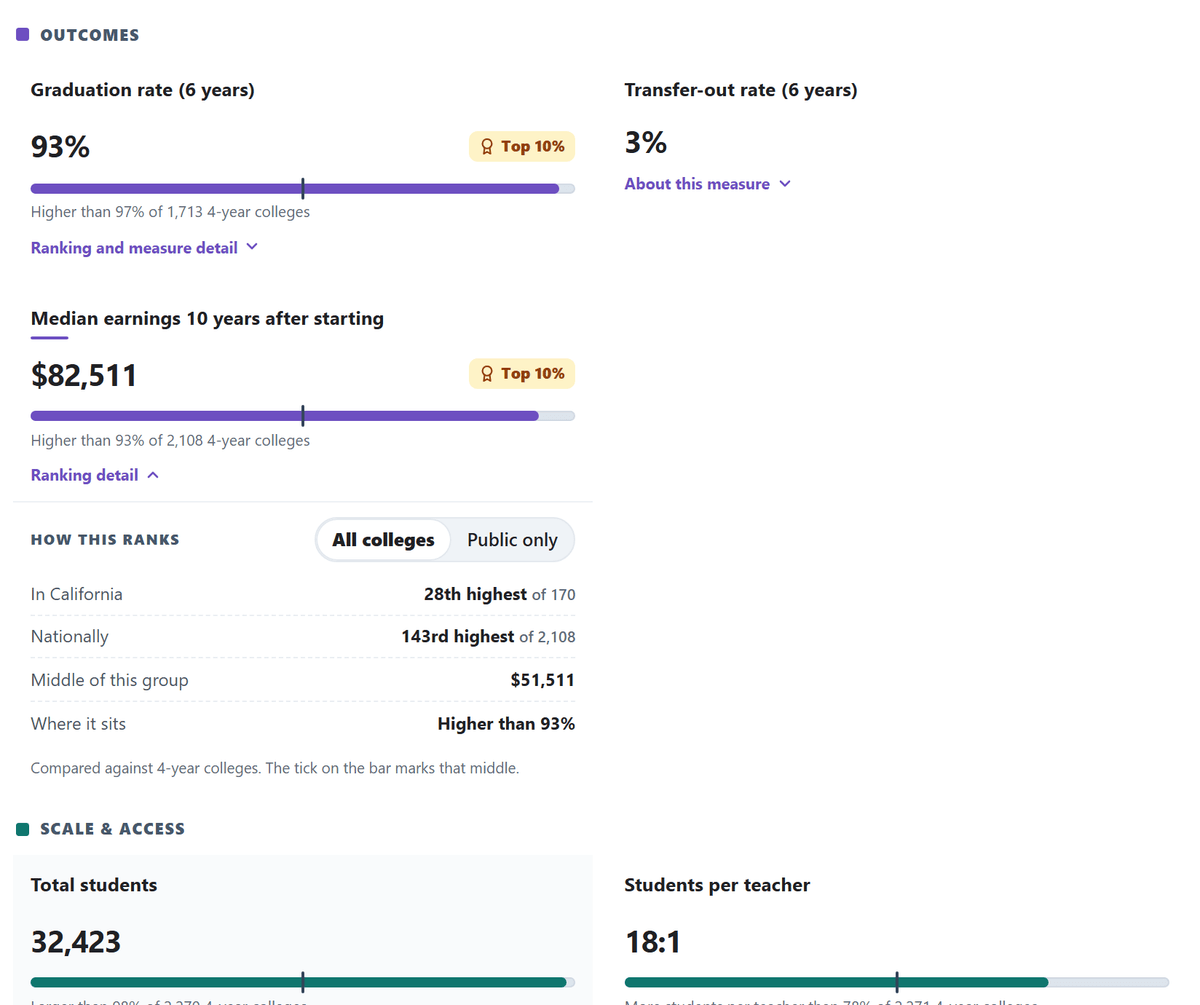
Graduation & earnings. Students can see how many UCLA students graduate and what former students earn over time.
Students can see how many UCLA students graduate and what former students earn over time.
Support is not guaranteed placement, and institution-wide earnings do not predict pay for a particular major.
What the recording shows
UCLA shows a six-year graduation rate of 93% and median earnings of $82,511 ten years after starting. Alex opens the graduation measure, then the earnings ranking and Public only comparison. The graduation measure covers a full-time, first-time IPEDS cohort tracked for six years. That graduation rate is not an average time to degree, and institution-wide earnings do not predict pay for a particular major.
Compare the same program. See how outcomes differ.
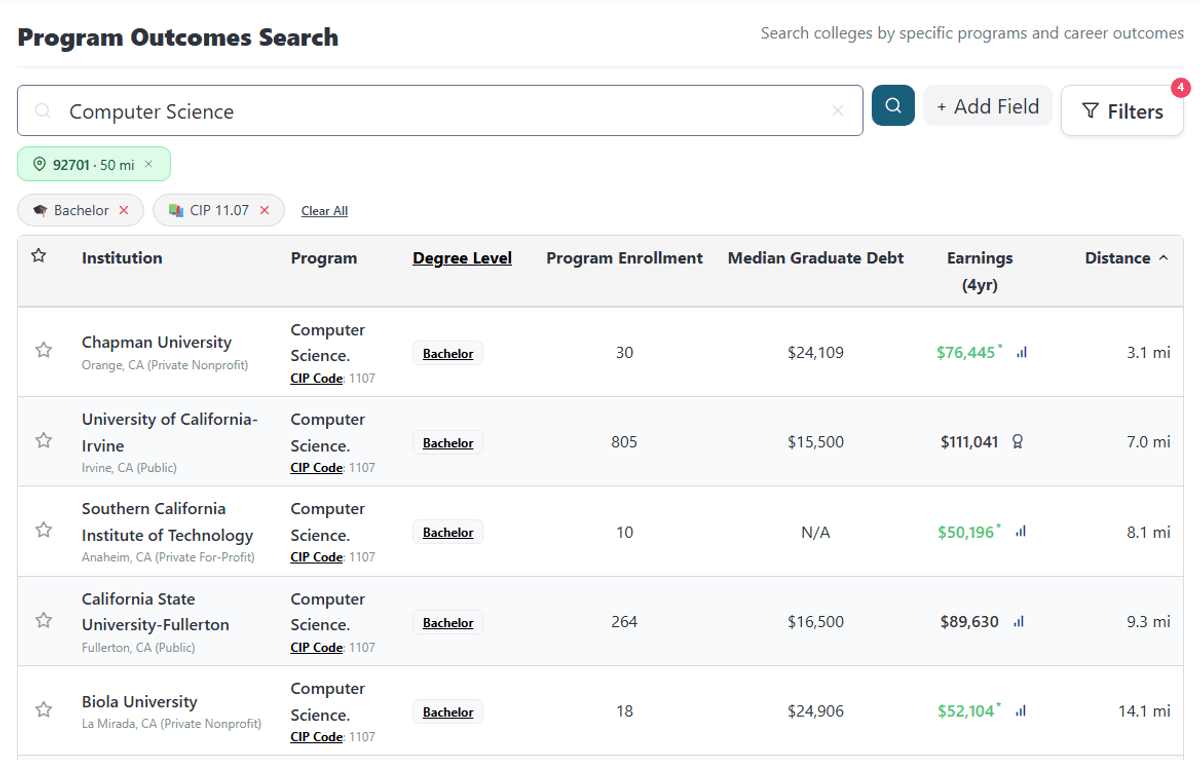
Search by program name. Students can find nearby programs in their field and compare options at the same degree level.
Students can find nearby programs in their field and compare options at the same degree level.
Earnings are one measure, not an overall quality ranking.
What the recording shows
Alex types Computer Science into the search bar. The field, bachelor’s degree level, and 50-mile radius around Santa Ana are already selected, keeping the comparison focused on the same field and degree level.
Part 2 of 4Support and next steps
What students get here, 05 of 05Experience, built in
Internships, research, and programs to find, plus how to reach out and what to send.
Told to find an internship? It is built in.
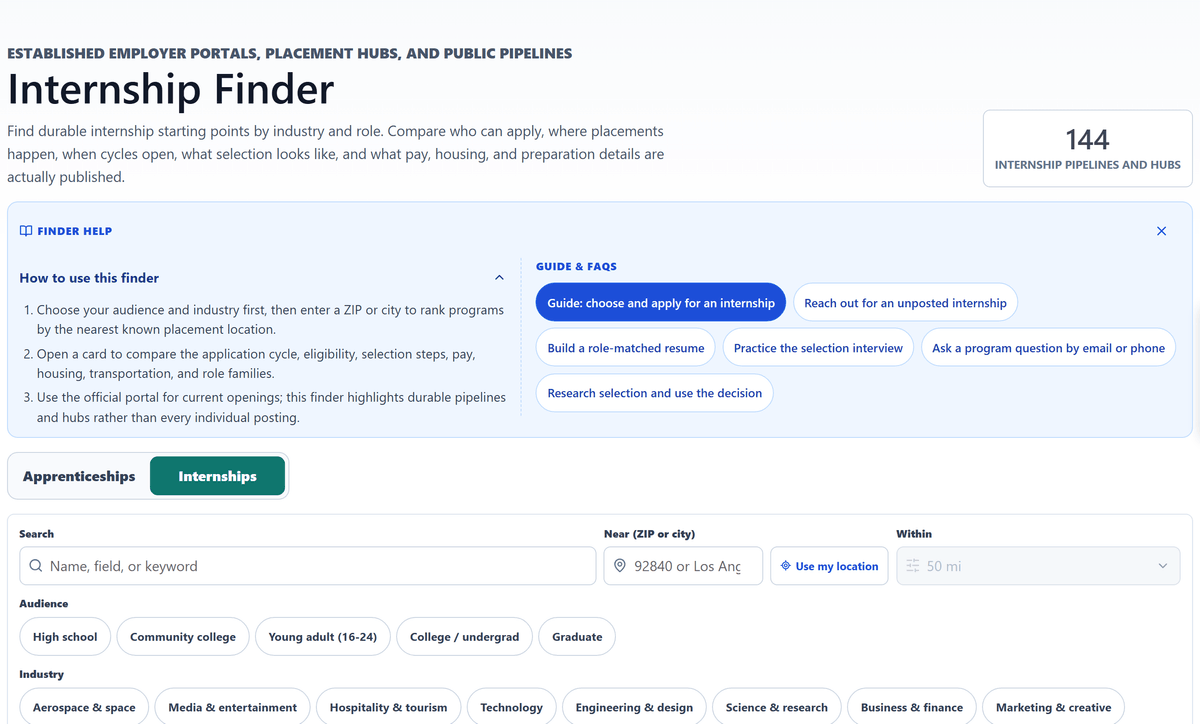
Find internships. When students are told to get an internship, the search is built in: pipelines near them, filtered by who can apply, with the guides and the email to send linked beside it.
When students are told to get an internship, the search is built in: pipelines near them, filtered by who can apply, with the guides and the email to send linked beside it.
What the recording shows
Alex opens the Internship Finder, set near ZIP 92701 within 50 miles. It lists internship pipelines and placement hubs, with filters for audience and industry, and links to the guides for choosing, reaching out, and interviewing.
The finder points to durable programs and official portals for current openings. It does not list every individual posting.
Assign a sequence, or let students set the pace.
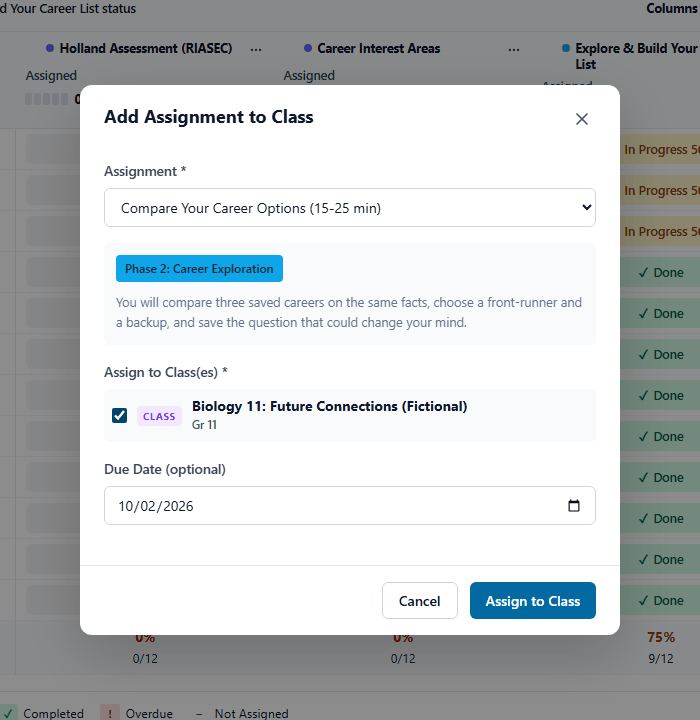
Assign it. Teachers and coaches can choose an activity, select a class, and set a due date.
Teachers and coaches can choose an activity, select a class, and set a due date.
What the recording shows
Dana assigns Compare Your Career Options to Biology 11: Future Connections (Fictional). The career-shortlist activity was already assigned; this is the next comparison activity.
Part 3 of 4Staff guidance
Know what the student did. Then keep going together.
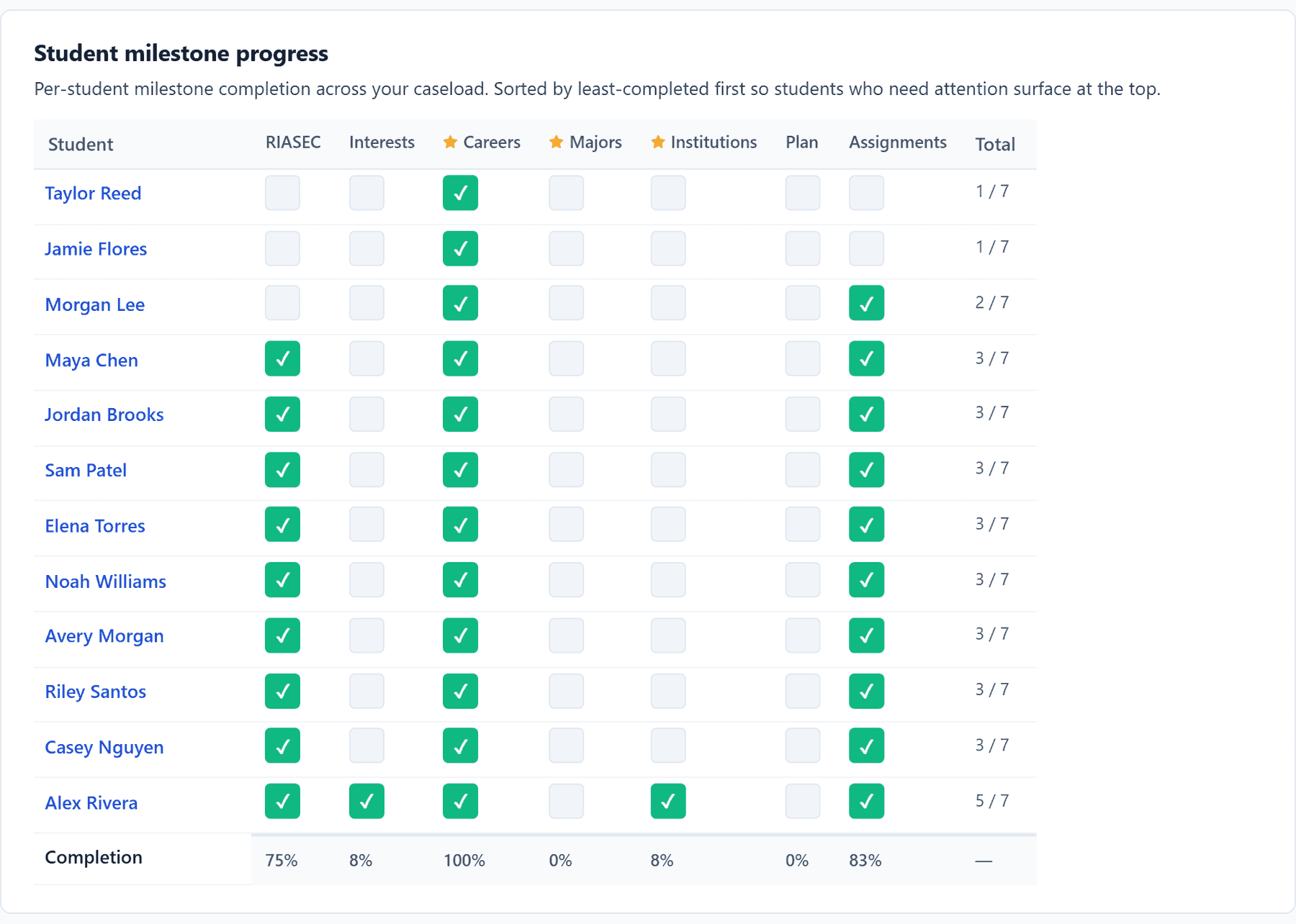
See the caseload. Counselors can see progress across their students and open a profile to prepare for the next conversation.
Counselors can see progress across their students and open a profile to prepare for the next conversation.
Anything you change with a student saves to their account and shows you as the person who made it. Notes in these examples are staff-only, and no email is sent.
What the recording shows
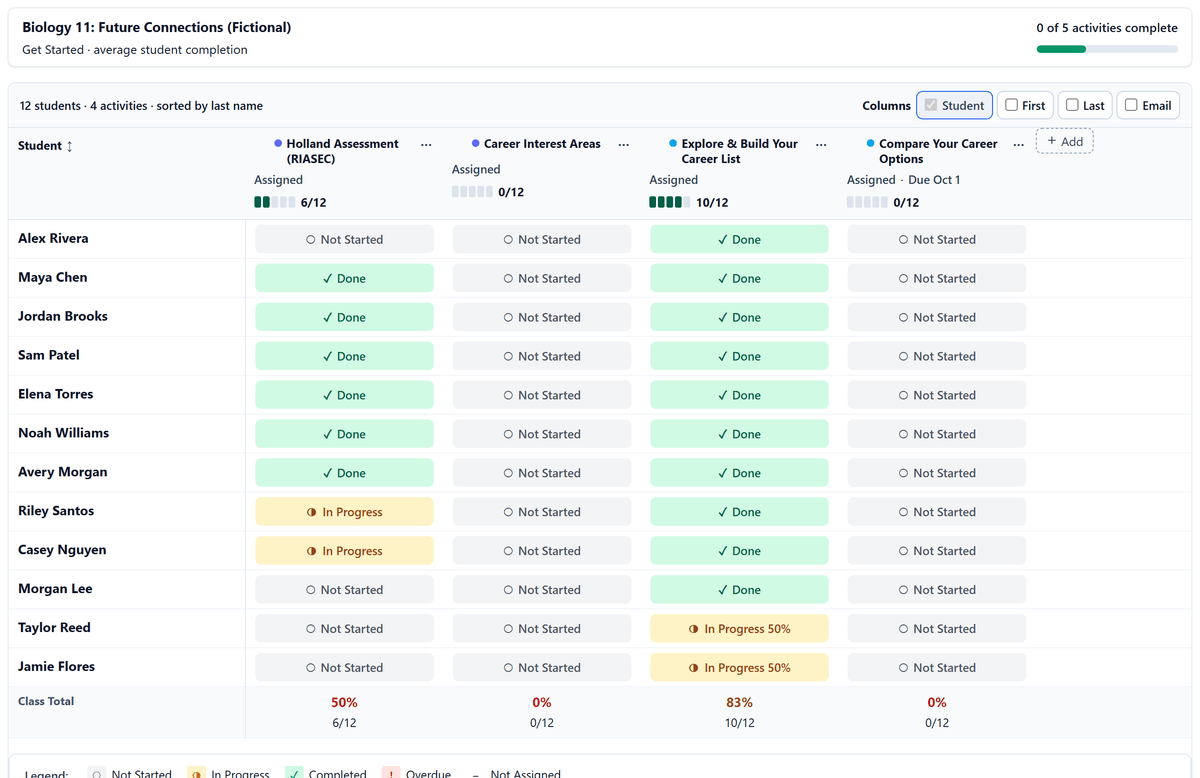
The counselor reviews the fictional 12-student caseload and its milestone heatmap, then opens Alex’s student profile. These are recorded platform activities, not verified education or employment outcomes.
One lesson. Different reasons to care. Beta
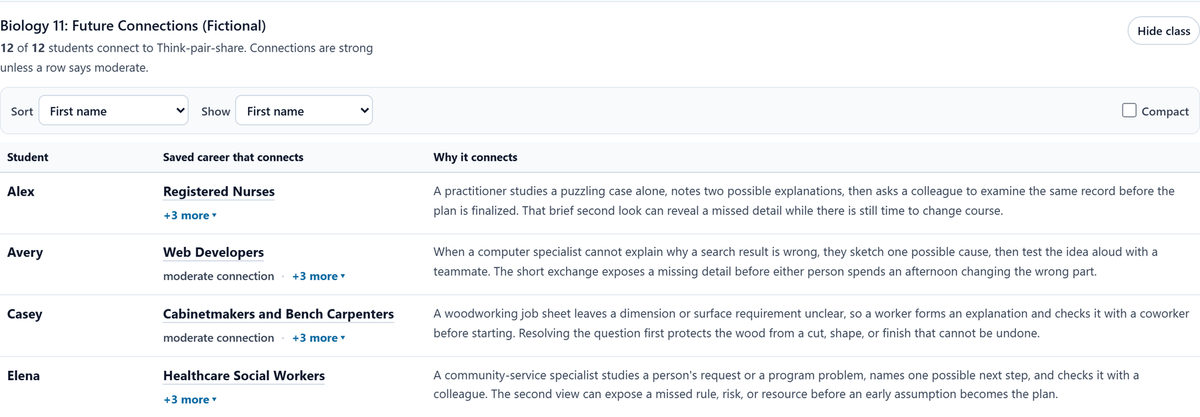
One activity, varied interests. Pick a classroom activity like think-pair-share and see how it connects to each student’s saved careers.
Pick a classroom activity like think-pair-share and see how it connects to each student’s saved careers.
Beta for high-school teaching, with coverage expanding. The activity is a classroom task, not a formal academic standard.
What the recording shows
The fictional class has varied career shortlists. The teacher opens the Think-pair-share activity and inspects the reviewed connections available for the class.
Part 4 of 4School and program reporting
Report what students did, in your funder’s language.
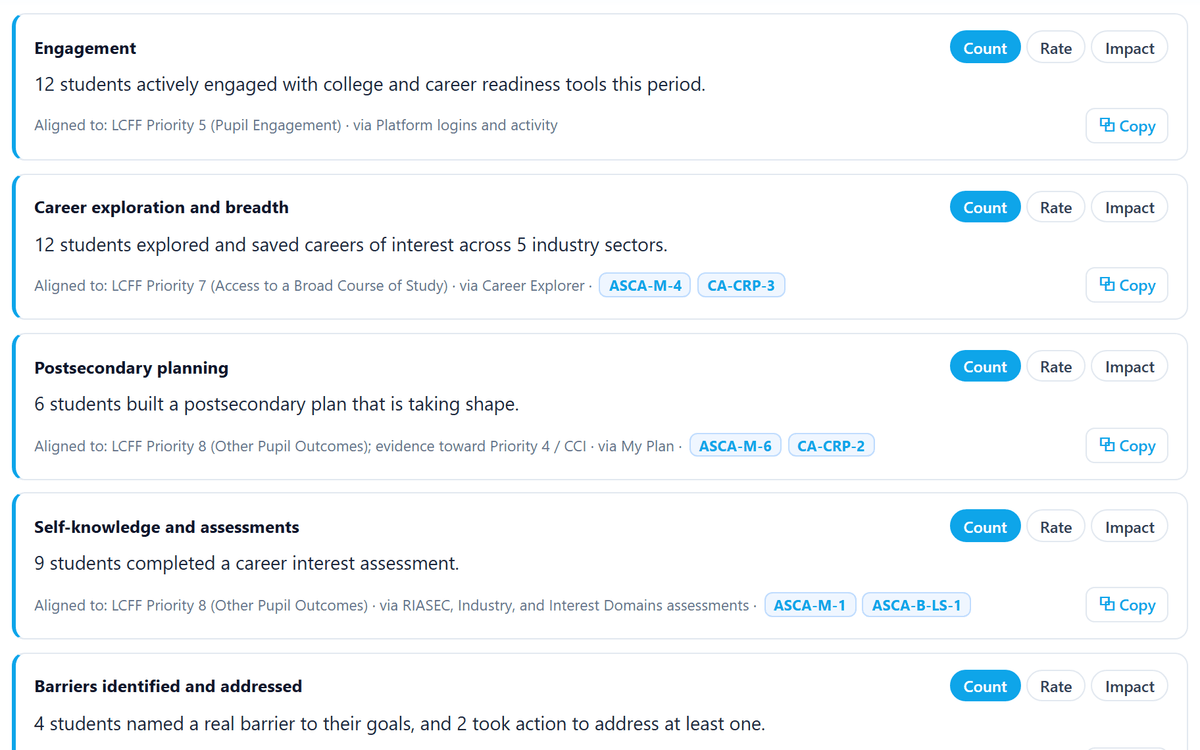
LCAP. Pick a lens and get Count, Rate, and Impact statements tied to LCFF priorities, each with its evidence table, ready to copy.
Pick a lens and get Count, Rate, and Impact statements tied to LCFF priorities, each with its evidence table, ready to copy.
These are platform-observed activities, not independently verified graduation, enrollment, or employment outcomes.
What the recording shows
Leslie reviews the fictional cohort’s engagement, switches a statement from Count to Rate to Impact, and copies it. The alignment connects platform activity to LCFF priorities; the evidence tables distinguish local engagement from official CALPADS outcomes.
What your team will ask
- Who it serves
- Grades 9 to 16+ today: high school, college, workforce. Grades 6 to 8 in Spring 2027, TK to 5 in Fall 2027.
- Schools and programs
- One program can span several schools, including students over 18 or out of school.
- Time
- 10 to 35 minutes per assignment, listed on each one.
- Devices
- Any browser: Chromebooks, laptops, tablets, phones. Nothing to install.
- Rostering and sign-in
- Google sign-in with CSV or OneRoster import today. LTI for Canvas, Clever, and ClassLink in Spring 2027.
- Student privacy
- Built FERPA and COPPA compliant. HECVAT available. SOC 2 Type 2 in progress for Spring 2027. Privacy overview HECVAT
- Pricing
- Quoted by request. Individual pilot plans are coming soon, credited back if your school buys within 18 months. How pricing works